Your family's personal assistant
The details
of running a home,
out of your head.
Tell Kin what the house needs in plain English. It puts it on your calendar, keeps the list, and emails you each morning with what's ahead.
Free to use · No credit card · Works in your browser
Thursday morning
lawn care every thursday
Got it — recurring lawn care every Thursday. I've put the next 12 on your calendar.
Reminder emailed each morning
What you get
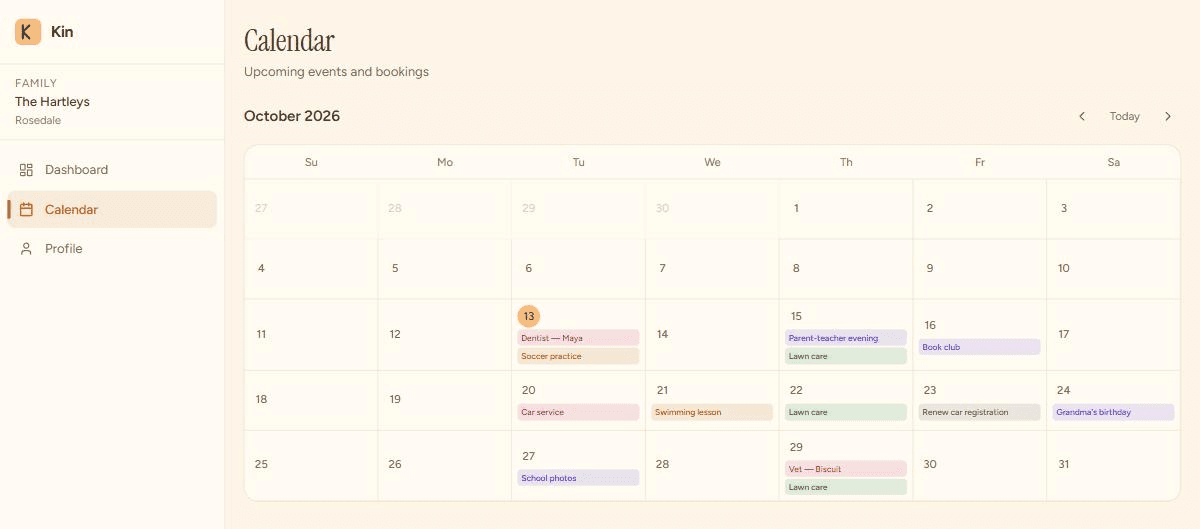
One calendar, filled in by typing.
Everything you tell Kin lands here — one-offs, appointments, and standing arrangements like the lawn on a Thursday.
What it does
Four fewer things to hold in your head.
Write it like a text
“lawn care every Thursday.” “dentist for Emma Friday at 2.” Kin picks out the date, the person and the task, and files it — no forms, no fiddling.
It lands on a calendar
Appointments, practices and recurring jobs all sit in one view, repeats included. Say it once and every Thursday is there.
A note every morning
One short email each day with what's coming in the next 24 hours — the dentist, the field trip, the renewal.
Remembers your household
Your family, your home, your preferences — stored once, so you never re-explain who Emma is or how big the yard is.
How it works
Type what the house needs
The way you'd text it to someone.
Kin files it
Onto your calendar and your list, straight away.
It reminds you
A short email each morning, so nothing depends on remembering.
What it doesn't do
Kin doesn't phone the plumber or book the dentist — it remembers that you need to, and makes sure the date doesn't get lost. It's one login per household today, and it's early, so tell us what's missing: hello@kinfamily.app.
Let Kin remember
the details.
Set your family up in a couple of minutes. It's free, and there's nothing to install.
Takes about two minutes.